How Ecommerce Teams Actually Use Noibu's AI Plugin (Across 6,000 Real Queries)

.png)
How ecommerce teams actually use Noibu's AI plugin
.gif)
Across roughly 6,000 real queries that ecommerce teams have run through the Noibu plugin, a clear pattern emerges: people aren't asking abstract questions, they're doing their jobs faster. The most common requests cluster around investigating errors, analyzing checkout and funnels, building quick dashboards and daily briefs, digging into products and collections, understanding traffic, and sizing revenue impact. In other words, the plugin gets used for the same work teams already do in Noibu — just asked in plain language and answered in seconds.
Below is how that breaks down in practice, and why each use case maps to a real job an ecommerce team is trying to get done.
1. Investigating errors — the number-one use case
The largest share of plugin queries is error investigation: "what's the highest-impact error on checkout right now?", "how many sessions did this issue affect this week?", "when did this start?" Instead of filtering the issues dashboard and cross-referencing revenue, the team asks and gets the answer with the impact already attached. This is the work that used to eat hours of replication and triage.
- Our plugin is more than just a raw data connection – it includes out-of-the box skills that allow merchants to run the most common types of ecommerce analyses and workflows.
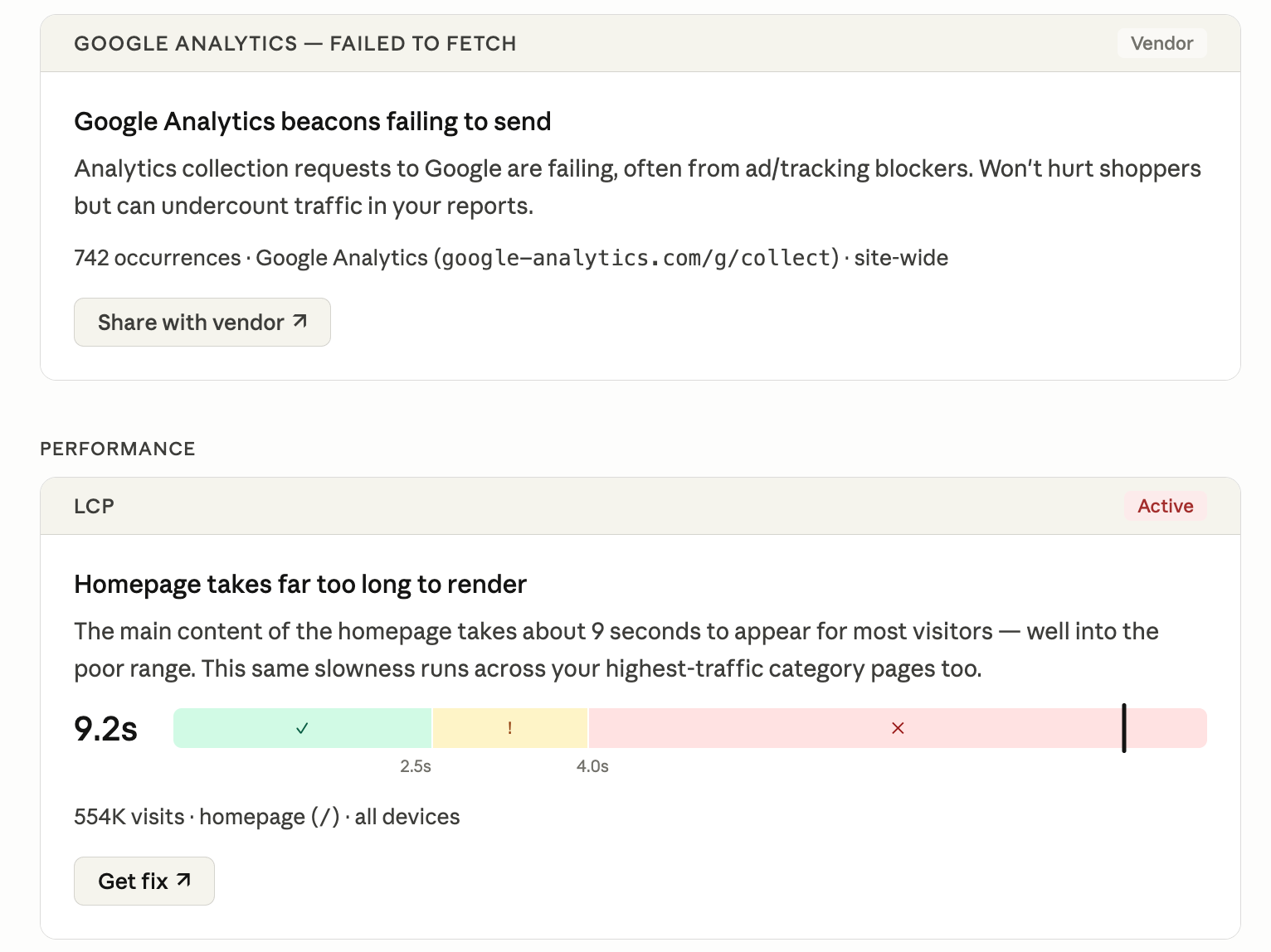
- The “Tech Diagnosis” skill (/tech-diagnosis) investigates a specific technical issue or performance problem — summarizing the issue, tracing the cause, and recommending a fix you can share back to engineering as a report or ticket
- Merchants use it to get a broad sweep overview of the most important first-party, third-party, and performance problems affecting their site, or dig into specific known issues to get to root cause and resolution faster.
2. Analyzing checkout and the conversion funnel
The second-biggest cluster is checkout and funnel analysis — asking where shoppers drop off, which step leaks the most revenue, and what's behind it. Because the plugin reads Noibu's funnel and session data, the answer comes back grounded in what real shoppers did, not a generic benchmark.
- Our plugin also includes a set of targeted deep-dive skills that run two-phase analyses (broad overview, then follow-ups on the most interesting signals) ending in 3–5 key findings with recommended actions.
- /checkout-analysis skill runs a targeted deep-dive into where buyers drop during checkout, and gives you key findings and recommended actions you can move on.
- One specialty tools retailer used this to help build the business case for express checkout by quantifying cart abandonment – analyzing drop-off at each step of checkout, and proposing where express checkout would compress the journey.

3. Building dashboards and daily briefs on demand
A large block of usage is teams asking the plugin to assemble a quick view — a morning brief of new high-impact issues, a summary of how checkout performed yesterday, a snapshot before a stakeholder meeting. The plugin pulls the underlying Noibu data and composes the summary, so people get the recurring readout without building or maintaining a report.
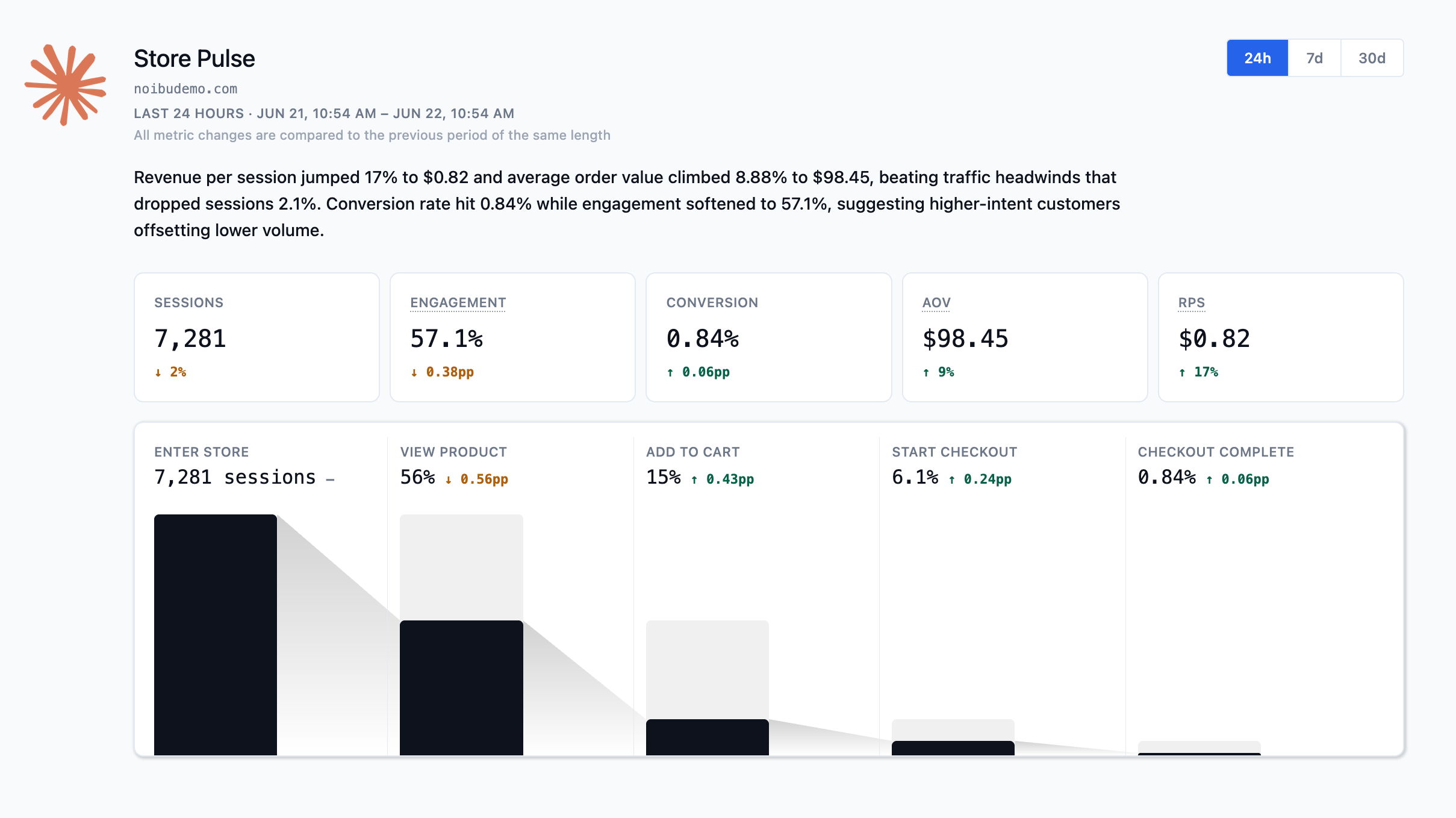
- Our plugin includes a “Store Pulse” skill (/store-pulse) that pulls together your store’s key metrics into a live dashboard in Claude to give you an overall look at traffic, conversion, and funnel progression.
- It renders a dashboard of your key ecommerce metrics for the time window you choose and can live as a Live Artifacts in Cowork, export to PDF, or set as a scheduled task that pushes to other connected services like Slack or Teams, Notion, Google Drive, Email, and even Jira.
- One merchant uses this approach to pull together data about new errors, CVR changes, and revenue vs. prior day into one automated morning brief.
4. Digging into products, collections, and traffic
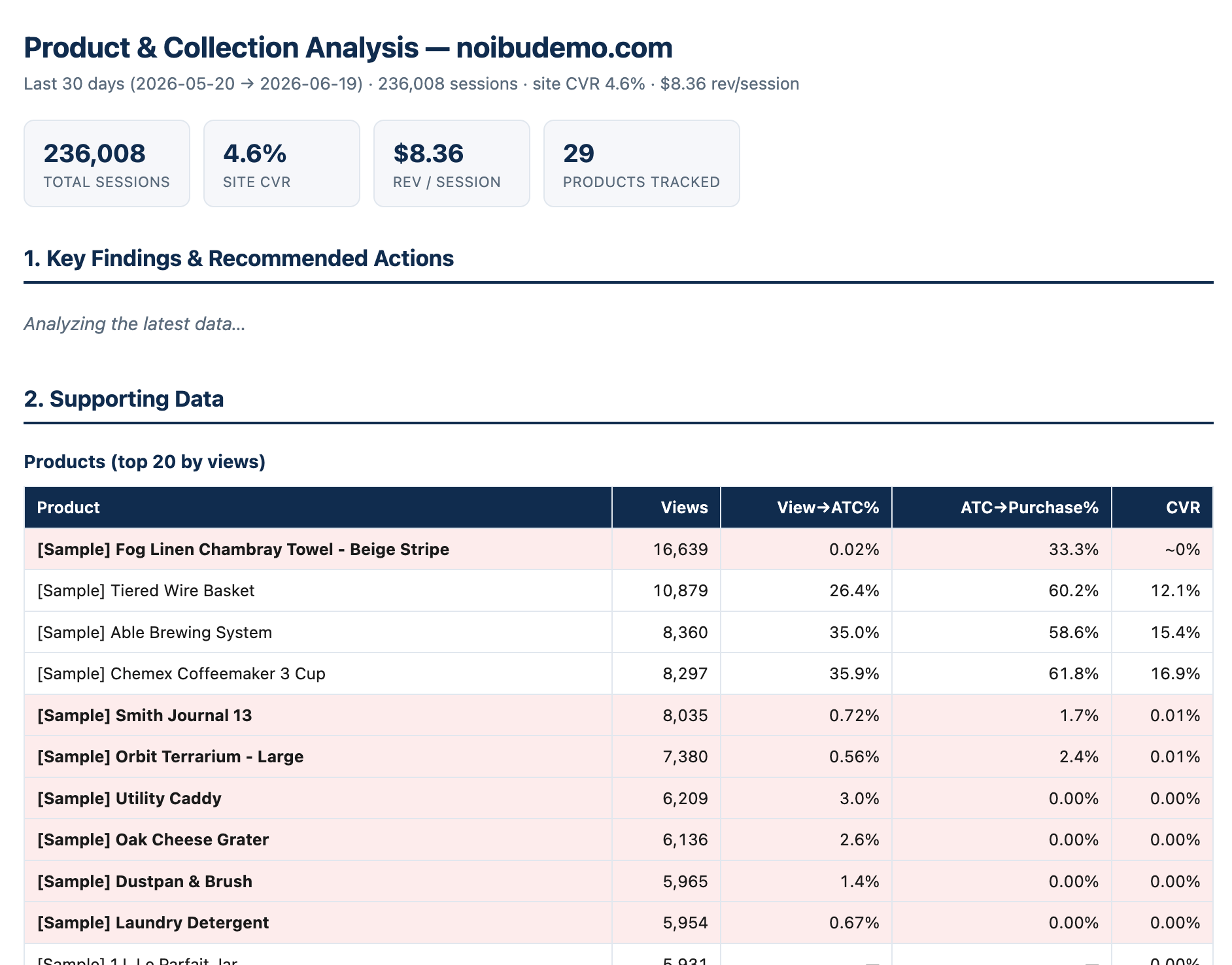
Teams also use the plugin for product and collection performance ("which PDP template is underperforming?") and for traffic and acquisition questions ("where is this segment coming from and how is it converting?"). These map directly to merchandising and growth decisions, and they're exactly the questions that used to require an analyst's time.
5. Sizing revenue impact to prioritize
Underneath nearly every other use case is the revenue question: what is this worth? The plugin answers it directly — the dollar impact of an issue, a funnel step, or a page — so teams prioritize by money instead of by gut. This is the capability customers consistently call out as the one that changes how they work.
- Noibu’s data model is built on ecommerce-native concepts that matter to merchants: funnel progression, PDP and PLP templates, cart abandonment, checkout drop-off, and revenue impact – it means that every analysis is grounded in these critical concepts and merchants arrive at meaningful insight faster
The one thing teams don't ask yet — and probably should
One category barely shows up in the data: asking how AI-assistant traffic is reaching the store. As shoppers increasingly start journeys inside AI assistants, that's about to become a real channel — and most teams aren't measuring it. We dug into how to start in a companion piece on measuring AI-assistant traffic.
What the plugin can and can't do
It reads all of your Noibu data and can update issue state — marking fixed, setting priority, assigning, adding comments — when you ask. It does not change your storefront or settings on its own; deeper actions like Slack messages, Jira tickets, or code pull requests run through your other connected tools with a person approving each step. For the full picture, see what the Noibu plugin is and how it works.
Frequently asked questions
Related topics
.avif)
.avif)