What Is the Noibu Plugin? Connect Your Ecommerce Data to AI Assistants
Megan Glover
June 29, 2026
Feature spotlights
What is the Noibu plugin?
The Noibu plugin connects your ecommerce analytics and monitoring data to an AI assistant, so anyone on your team can ask questions about site errors, checkout friction, performance, and lost revenue in plain language — and get answers grounded in your store’s real session data instead of generic advice. It turns the Noibu platform into something you can talk to: you ask “what’s hurting checkout conversion this week?” and the assistant pulls the actual issues, sessions, and revenue impact from your account to answer.
TL;DR
The Noibu plugin lets your team query your ecommerce analytics and monitoring data through an AI assistant, in plain language.
It reads everything in your Noibu account — errors, sessions, checkout funnels, performance/Core Web Vitals, and revenue impact — and can update issue status (mark fixed, set priority, assign) when you explicitly ask.
It does not autonomously change your store or your settings. Deeper actions — Slack messages, Jira tickets, code PRs — run through your other connected tools, with a human approving each step.
Today it runs as the Noibu plugin for Claude; the same data layer is built to power other AI assistants over time.
How the Noibu plugin works
1
You ask in plain language
“What’s hurting checkout conversion this week?”
2
The plugin pulls your real Noibu data
Errors, sessions, funnels, performance & revenue impact — from your account.
3
You get a grounded answer
Backed by real sessions — plus an optional issue-status update when you ask.
For ecommerce teams, the value is removing the gap between a question and an answer. Instead of opening a dashboard, building a filter, exporting a CSV, and interpreting it, a merchandiser, PM, engineer, or support lead can ask the assistant directly — and because the answer is grounded in Noibu’s data, it reflects what your real customers are actually experiencing on your site.
What “talk to your data” looks like
What’s hurting checkout conversion this week?
A JavaScript error on the payment step is firing for shoppers on Safari, affecting 1,240 sessions in the last 7 days with an estimated $18,400 in revenue at risk. It started after Tuesday’s release. Want me to mark it high priority and assign it?
Illustrative example. Real answers are grounded in your account’s session data.
What can the Noibu plugin actually do?
The plugin’s capabilities fall into two clear buckets: what it can read (everything) and what it can change (issue state, only when you ask). Understanding the boundary matters, because it’s what makes the plugin safe to put in front of a whole team rather than just engineers.
✓ What it can do
Read everything in your Noibu account — errors, sessions, checkout funnels, performance, revenue impact
Answer questions about that data in plain language
Size the dollar impact of an issue, page, or funnel step
Update issue state — mark fixed, set priority, assign, add comments — when you ask
– What it won’t do on its own
Edit your storefront or change your Noibu settings
Create release events, alerts, or page groups
Send Slack messages, open Jira tickets, or push code PRs autonomously
Act without you — deeper actions run through your other tools, human-approved
It reads all of your Noibu data
Ask about any of the data Noibu captures, and the assistant retrieves and interprets it for you:
Errors and issues — what’s broken, how many sessions it’s hitting, when it started, and the estimated revenue impact.
Checkout and funnel analysis — where shoppers drop off, which step leaks the most revenue, and what’s causing it.
Performance and Core Web Vitals — which page groups are slow, what regressed, and how it maps to conversion.
Session and journey data — which sessions match a problem, what users did, and where friction shows up.
Revenue sizing — the dollar impact of a given issue, page, or funnel step, so you can prioritize by money, not guesswork.
100%
of your Noibu data is readable through the plugin — errors, sessions, checkout, performance, and revenue impact, all queryable in plain language.
It can update issue state — when you ask
Beyond reading, the plugin can take a specific, bounded set of write actions on issues in your Noibu account when you explicitly request them: marking an issue as fixed, ignored, or in progress; setting its priority; assigning it to someone; or updating its description and comments. These are the same updates a team member would make in the Noibu dashboard — the plugin just lets you make them in the flow of a conversation.
What it does not do
The plugin is deliberately scoped. It does not autonomously edit your storefront, change your Noibu configuration, create release events or alerts, or take broad actions on its own. When a workflow needs to reach beyond Noibu — sending a Slack message, opening a Jira ticket, drafting a code fix as a pull request — that runs through your other connected tools, and a person stays in the loop to approve each step. The plugin surfaces the insight and can update the issue; your team decides what happens next.
"Before Noibu, we had no visibility into any of our front-end errors… Now we have a single pane of glass that our teams can go to and understand what the issue is, how many people is it impacting, when did the issue start, and what's the impact ultimately to our conversion funnel."
— Nathan Armstrong, Director of Customer Solutions, Pampered Chef
Who is the Noibu plugin for?
Because it reads in plain language and the data is ecommerce-specific, the plugin lowers the barrier to using site data across the whole team — not just the people who live in dashboards:
Ecommerce managers and merchandisers ask where revenue is leaking without waiting on an analyst.
Product managers size the impact of a bug before deciding whether it makes the sprint.
Engineers and QA pull the exact sessions and technical detail behind an issue to start a fix.
Customer support and CX leads check whether a complaint is a widespread issue or a one-off.
See it in action
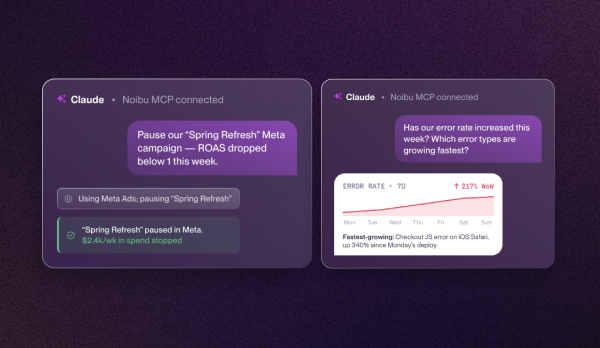
Here’s the plugin answering a real ecommerce question, with the issue, the sessions affected, and the revenue impact returned in one grounded response:
How is this different from connecting a raw AI assistant to your store?
A general-purpose AI assistant on its own has no idea what’s happening on your site. It can reason about screenshots you paste or guess from descriptions, but it can’t see your error data, your real sessions, or the revenue tied to a broken checkout step. The Noibu plugin closes that gap: it gives the assistant a grounded, ecommerce-specific data source, so answers are about your store, backed by 100% of your captured sessions rather than a sample. That grounding is the difference between an assistant that sounds plausible and one that’s actually right about your business.
Frequently asked questions
Does Noibu have an AI plugin?
Yes. The Noibu plugin connects your Noibu ecommerce analytics and monitoring data to an AI assistant, letting your team ask questions about errors, checkout, performance, and revenue impact in plain language and get answers grounded in your real store data. It currently runs as the Noibu plugin for Claude.
What can the Noibu plugin do?
It reads all of your Noibu data — errors, sessions, checkout and funnel analytics, performance and Core Web Vitals, and revenue impact — and answers questions about it. It can also update issue state in your account (mark fixed, set priority, assign, add comments) when you explicitly ask it to.
Can the Noibu plugin make changes to my store on its own?
No. The plugin does not autonomously change your storefront or your Noibu settings. It reads data and can update issue status when asked. Deeper actions like Slack messages, Jira tickets, or code pull requests flow through your other connected tools, with a person approving each step.
How is the Noibu plugin different from using ChatGPT or Claude on its own?
A raw AI assistant has no access to your site’s error, session, or revenue data. The Noibu plugin grounds the assistant in 100% of your captured ecommerce data, so answers reflect what your real customers are experiencing rather than generic guesses.
Which AI assistants does the Noibu plugin work with?
Today the plugin runs as the Noibu plugin for Claude. The underlying data connection is built to extend to other AI assistants over time, so your team can use the same grounded ecommerce data wherever they work.


.png)
.avif)