Why ecommerce releases quietly break conversion


The quiet conversion killer most ecommerce teams never name
Conversion drops rarely have obvious villains.
Traffic holds. Server uptime is green. The analytics dashboards refresh normally. And yet the conversion rate is a quarter-point lower than it was last Tuesday. At the weekly business review, someone says, "We should look into that." By the time anyone does, ten more releases have shipped and the trail is cold.
Ask the engineering lead what changed on the day the dip started, and you'll usually get a variation of the same answer: a release went out, but nothing in monitoring lit up, so we didn't think to connect them.
That's the gap this post is about.
What "silent regression" actually means in ecommerce
A regression is any change introduced by a release that makes the site worse for shoppers. That "worse" can show up in three very different ways, and most teams only monitor for one of them.
Stability regressions
New errors appear in the logs. A JS error on a specific browser. A fetch failure on a specific PDP template. An unhandled edge case in the cart API. These are the ones error monitoring tools are built to catch — but teams still miss them because volume gets buried in noise, and the ones that matter (the ones blocking checkout on Safari iOS, for example) don't always spike loud enough to trigger an alert.
Performance regressions
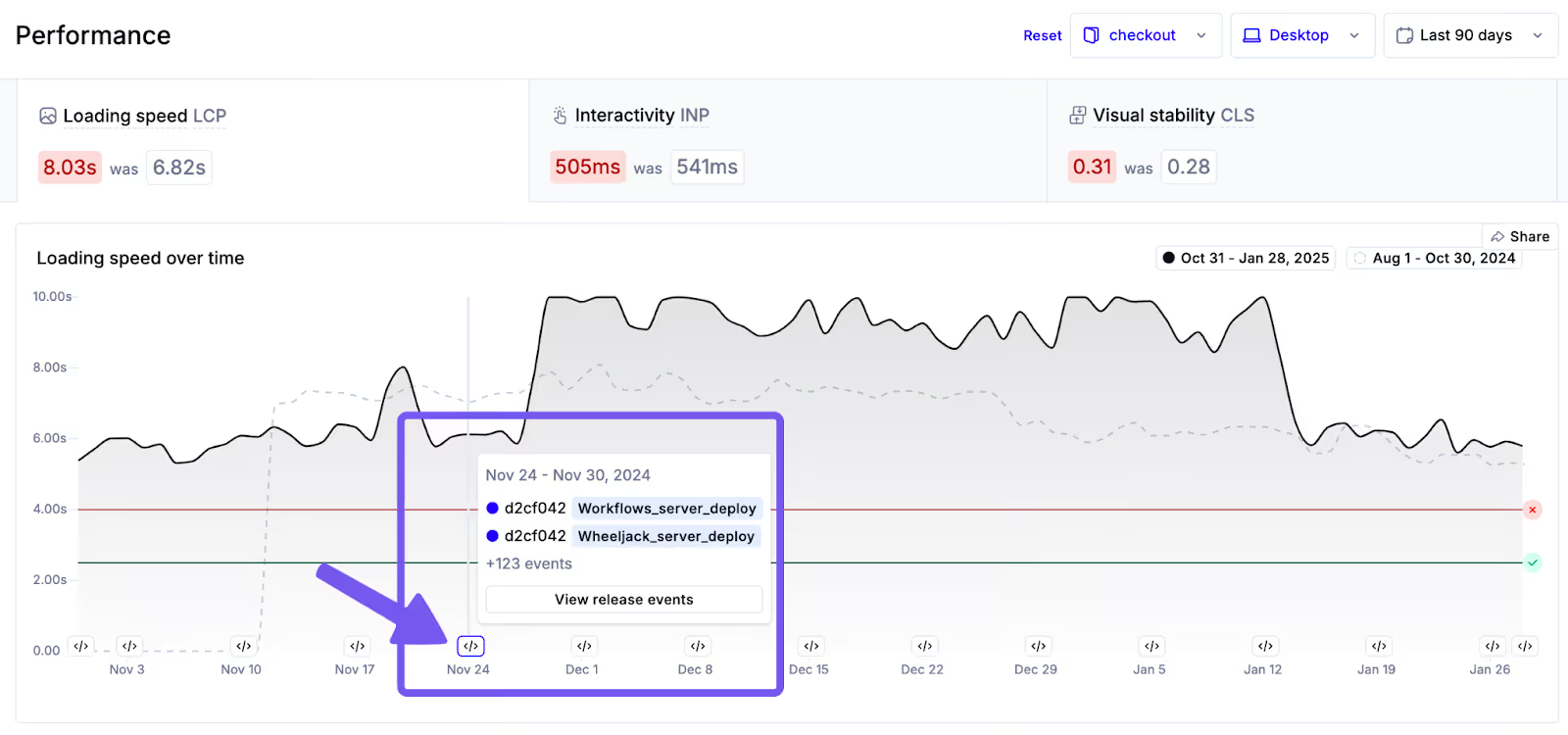
The page still works. It's just slower. A new script weight. An un-cached asset. A layout shift introduced by a hero image swap. Sites with a one-second delay in LCP can lose up to 7% in conversions. Most release monitoring workflows never surface performance changes at all.
Behavioural regressions
The error log is clean. The page is fast. But shoppers are rage-clicking the newly-redesigned filter dropdown. Add-to-cart rate on the updated PDP template is down three points. Nobody gets an alert for this, because nothing "broke" in a technical sense — the release just made the experience worse, and the funnel quietly follows.
All three are release-caused. All three cost revenue. Only one of them reliably shows up in a traditional monitoring stack.
Why the detection gap is usually two weeks, not two hours
There's a common pattern in how ecommerce teams actually discover release-caused regressions:
- The release ships on a Wednesday.
- The weekly conversion report runs the following Monday. Something looks off, but the dip isn't big enough to trigger an incident.
- The next week's report confirms the dip is real. Someone opens a ticket to investigate.
- A few days later, engineering traces it back to the Wednesday release two weeks ago.
- The fix ships the week after that.
Three weeks from cause to fix. At a site doing $50M a year, a 1% sustained conversion drop over three weeks is roughly $29,000 in lost revenue before anyone identifies the root cause.
This pattern is what ecommerce leaders describe when they say their monitoring is "reactionary" or "we're always chasing." It isn't that the team is slow. It's that the tooling isn't designed to connect deployments to shopper outcomes in the first place.
"The biggest unlock for my dev team is to be able to detect regressions before they become an issue. When we release code, we know instantly if we've introduced a regression to the site, which is really powerful for us to detect the health of our business."
— Matt Ezyk, Sr. Director of Engineering Ecommerce, Hanna Andersson
Five real ways a release silently breaks ecommerce conversion
These are the failure modes Noibu sees most often in customer environments after a deployment. Each one is invisible to at least one category of traditional monitoring. All of them connect to revenue.
1. A new JS error that only fires on certain devices or browsers
A minor refactor introduces an exception on Safari iOS 17. Desktop users never see it. Your error count barely moves in aggregate. But mobile checkout completion is suddenly down four points, and mobile is half your traffic.
2. Broken field validation on checkout
A form update changes the regex on the postal code field. Customers in specific regions can no longer proceed. Support gets three tickets. Most customers just abandon and don't come back. Under 1% of customers typically report issues they encounter. The other 99% become silent churn.
3. An LCP regression from a newly-added script
Marketing adds a new personalization tag. It's async, it "shouldn't affect performance" — but LCP on the PDP drifts from 2.4 to 3.1 seconds. No error. No alert. Just a slow, measurable haemorrhage from the top of the funnel.
4. A third-party integration that broke after a platform update
Your CMS or ecommerce platform pushes an update. A payment gateway integration, a tax-calculation service, a review widget — any of them can quietly misbehave. The site is up. Your error monitoring is clean. But Apple Pay has been failing intermittently for three days and nobody caught it.
5. A UX change that looks fine in staging but doesn't in the wild
A redesigned filter, a new size selector, a moved CTA. In staging, everything works. In production, real shoppers rage-click because the behaviour is subtly different from what they expect. Add-to-cart rate drops. Nothing alerts.
What ecommerce release monitoring actually needs to do
Most tools marketed as "release monitoring" are really deployment trackers: they mark a line on a dashboard when a deploy happens, and leave it to the engineer to correlate that line with whatever goes wrong afterward.
That's not enough for ecommerce. A proper ecommerce release monitoring system needs to do four things:
1. Automatically correlate every deployment with site behaviour
The system should know when you deployed without you having to tell it, and it should immediately start comparing the site's stability, performance, and shopper behaviour against the pre-release baseline. Not after the next incident. The moment the deploy lands.
2. Prioritize regressions by revenue impact, not by error count
A new error that fires 10,000 times a day but lives on a rarely-visited admin page is less urgent than an error that fires 50 times a day on the checkout page. Ecommerce release monitoring needs a native understanding of the funnel — checkout errors outweigh PDP errors outweigh PLP errors, all else equal — and it needs to price each regression in dollars of revenue at risk, not just occurrences.
3. Capture full context for fast reproduction
When a regression is detected, the engineer's next question is always the same: can I see it happen? A complete release monitoring system should hand them the exact session where the regression fired, with the stack trace, the HTTP payload, the environment, and the behavioural signals that led up to it. No more "I have to log in as the user and recreate it."
4. Cover all three regression types in one place
Stability, performance, and behaviour. One dashboard. One timeline tied to one deployment. If a team has to switch between error monitoring, APM, and a separate session replay tool to piece together what a release did, the regression is already winning.
How Noibu's Release Monitoring closes the gap
Noibu is built from the ground up for ecommerce, and Release Monitoring is one of its five core product lines — not a deployment marker bolted onto an error tool.
Here's what changes when release monitoring is actually purpose-built for ecommerce:
Every deployment is automatically connected to every behavioural and technical change that follows. Noibu ingests your CI/CD signals and starts comparing against baseline the moment a release is live. No manual correlation, no "was it the Tuesday deploy or the Thursday one?"
Regressions are ranked by annualized revenue impact. The first thing you see after a release isn't a list of errors sorted by count. It's a list of what changed in dollars — which issues emerged, which ones regressed, which pages got slower, and what each of those is estimated to cost if left alone. Prioritization is instant.
Full session context is attached to every flagged regression. Each new or regressed issue comes with the session replay, stack trace, HTTP payload, and environment details. Session replays are captured for 100% of sessions — no sampling — so the one that matters is always there when you need it.
Performance, stability, and behaviour live in the same view. A release that introduced a new JS error, slowed the PDP by 400ms, and caused a 2% rage-click increase on the filter bar shows up as one correlated incident, not three fragmented ones across three tools.
"When we do a release, we really count on Noibu. We know that if there's an issue, Noibu will detect it just like a customer would. We can address it immediately."
— Yannick Vial, Sr. VP of Digital Development & Unified Commerce, La Maisons Simons
A practical release monitoring playbook for ecommerce teams
If you want to move from "two weeks to detect" to "two hours to detect," here's a workable sequence — regardless of which tools you use.
- Instrument every deployment. Treat each release as an event, with a timestamp and a changelog. If your CI/CD system doesn't emit a webhook, wire one up. You cannot correlate what you don't capture.
- Define the metrics that matter before the release. For every deploy, you should know in advance which funnel stages, page templates, and performance metrics you're watching. Set thresholds.
- Watch for all three regression types — not just errors. Build alerts for stability (new error signatures, error rate changes), performance (LCP, INP, CLS on key page types), and behaviour (rage clicks, add-to-cart rate, checkout completion).
- Price regressions in dollars. Every flagged regression should carry an estimated revenue-at-risk figure. This is what turns a "we should look at this" into a triaged priority the engineering team actually acts on.
- Attach full session context to every regression. When the alert fires, the engineer should be one click away from watching the session where it fired. No recreation. No guesswork.
- Run a post-release review — every release, not just the big ones. Five minutes a day is enough to catch 80% of silent regressions before they compound.
Teams that follow this loop stop discovering last week's regression at next week's business review. They close the detection gap to the same day — often within hours of the deploy itself.
"Noibu acts as a safety net for us. We can quickly identify if an issue is due to our code, BigCommerce's updates, or changes made by third-party services integrated into our site. This comprehensive oversight allows us to move forward confidently without major disruptions."
— Mike Hoefer, Director of Web Product & Strategy, King Arthur Baking Company
Related topics:
- How ecommerce teams consolidate monitoring and experience analytics into a single platform
- The practical guide to Page Analysis and Digital Experience Analytics for ecommerce
- What ecommerce monitoring actually includes — and what most tools miss
Stop finding out about regressions at next Monday's business review
The teams Noibu works with don't talk about release monitoring as a defensive capability. They talk about it as the reason they can ship faster, batch less, and trust the numbers on the conversion dashboard.
If your team is still discovering release-caused conversion dips in the weekly review — or worse, hearing about them from the CX inbox — the gap is fixable, and it's fixable this quarter.
Get a free website audit → We'll show you the regressions, errors, and performance issues currently quietly reducing your conversion rate, along with an estimate of the revenue they're costing you — no deployment required.
Or request a demo of Noibu Release Monitoring to see how it connects every deployment to the stability, performance, and shopper behaviour changes that follow.
About Noibu
Noibu is an ecommerce analytics and monitoring platform that gives teams complete visibility into errors, performance, sessions, and digital experience — so issues and opportunities are found, prioritized, and acted on before customers feel the impact.