Noibu blog

Digital Experience Analytics for Ecommerce, Explained

Digital experience analytics for ecommerce

TL;DR

  • Web analytics tells you what happened on your site. Digital experience analytics tells you why — where shoppers struggle, what frustrates them, and what makes them leave.
  • DXA brings together heatmaps, click and scroll maps, session replay, journey and funnel analysis, and frustration signals like rage clicks into one view of the real shopper experience.
  • Ecommerce needs DXA more than most because every moment of friction maps directly to lost revenue — a conversion-rate dip is a question, not an answer.
  • Many DXA tools sample sessions, demand heavy tagging, and stop at pretty heatmaps without connecting behaviour to a technical cause or to revenue.
  • Noibu delivers DXA as part of a full ecommerce analytics and monitoring platform — 100% capture, no tagging lift, and every behavioural insight tied to the issue and the revenue behind it.

Digital experience analytics (DXA) is the practice of understanding why shoppers behave the way they do on your site — where they hesitate, what frustrates them, and what makes them leave — rather than just counting what they did. For ecommerce teams, it’s the difference between knowing your conversion rate dropped and knowing the exact moment on the page that caused it.

Traditional web analytics is very good at counting. It will tell you how many sessions reached checkout and how many converted. What it cannot tell you is why the other shoppers left — and on an ecommerce site, that “why” is where revenue is won or lost.
What is digital experience analytics?

Digital experience analytics is a category of tools that observe and explain real user behaviour on a website or app. Where web analytics aggregates events into metrics, DXA reconstructs the experience: it shows you how far people scroll, what they click and ignore, where they get stuck, and how they move through the journey. The goal isn’t more numbers — it’s the reason behind the numbers you already have.

Two questions, two tools

vsWEB ANALYTICSTells you WHAT happened▸ Pageviews & sessions▸ Conversion rate▸ Funnel drop-off %Numbers onlyDIGITAL EXPERIENCE ANALYTICSTells you WHY it happened▸ Where shoppers struggle▸ What frustrates them▸ Why they abandonContext + cause

Web analytics and DXA answer different questions. Ecommerce teams need both — but only one explains the drop.

What digital experience analytics includes

DXA isn’t a single feature — it’s a set of capabilities that together reconstruct the shopper experience:

What digital experience analytics includes

🗺️👆📜HeatmapsClick & tap mapsScroll depthwhere attention goeswhat they interact withhow far they get▶️🔀😤Session replayJourney & funnelFrustration signalsthe journey, replayedwhere they drop offrage & dead clicks

The capabilities that make up digital experience analytics, working together.

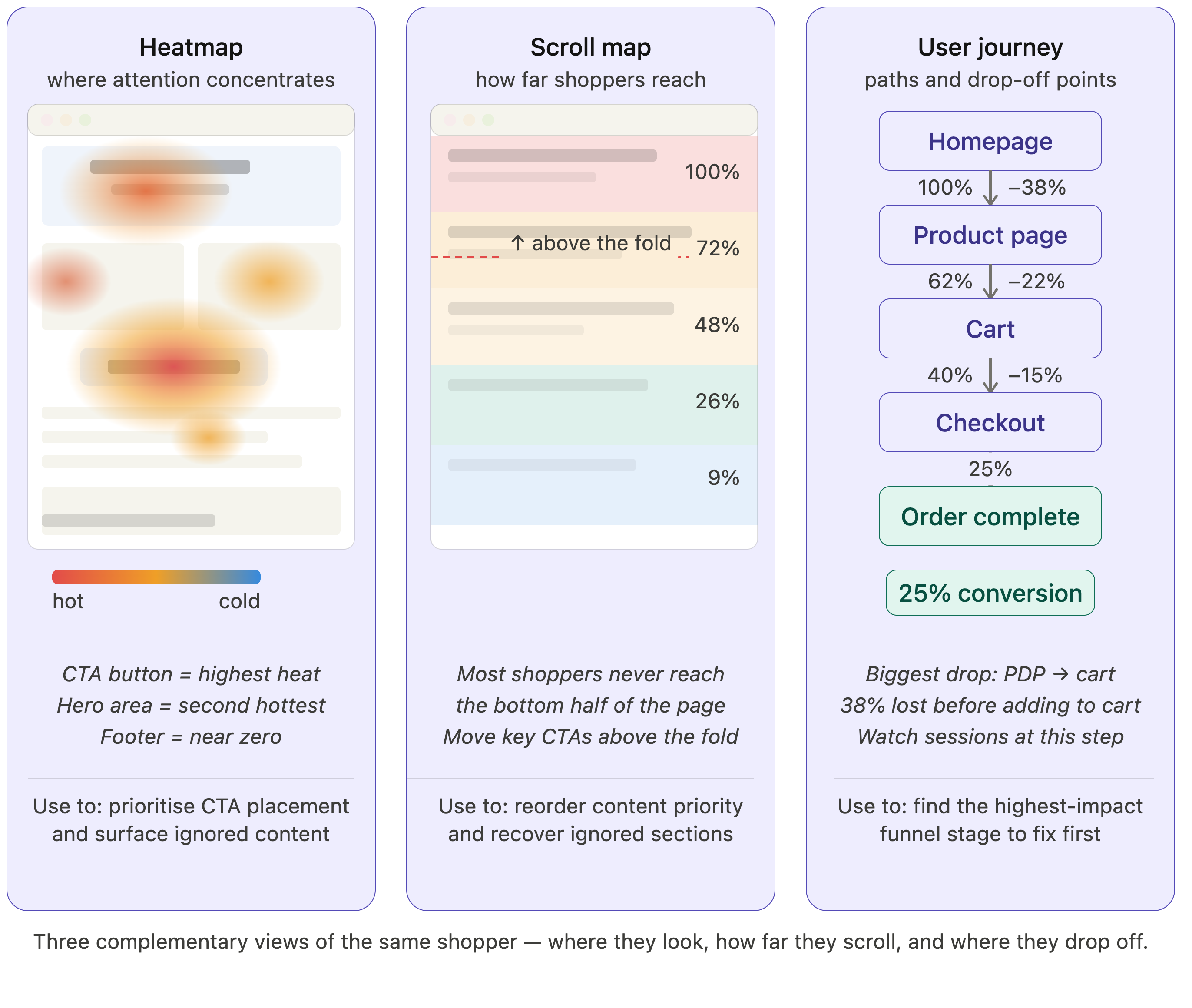
Heatmaps and scroll maps show where attention concentrates and how far down a page shoppers actually get. Click and tap maps reveal what people interact with — and what they try to tap that isn’t clickable. Session replay reconstructs individual journeys so you can watch the real experience. Journey and funnel analysis shows where shoppers move and where they drop. And frustration signals — rage clicks, dead clicks, erratic movement — surface the silent struggles that never trigger a technical error.

"Being able to see emotional behaviour — people rage clicking, even when a purchase goes through — has been really helpful. We're able to see that, fix it, and improve it for the next time."

— Julian Charnas, Director of Digital Commerce, Harman Inc.

Why ecommerce teams need digital experience analytics

Every business benefits from understanding its users, but ecommerce raises the stakes. On a retail site, the experience is the storefront, and every point of friction has a price. A confusing size selector, a scroll that hides the “add to cart” button, a checkout field that fights mobile shoppers — each one converts measurable traffic into measurable lost revenue.

Web analytics will show you the dip. It won’t show you that the dip is a filter on the collection page that resets on every tap. DXA closes that gap: it turns “conversion fell 4% on mobile” into “mobile shoppers can’t complete the size picker, here’s the session.” For teams whose revenue depends on the funnel, that’s not a nice-to-have — it’s how you find the money you’re leaving on the table.

Web analytics counts the conversion you lost. Digital experience analytics shows you the moment you lost it — which is the only version you can fix.

Noibu, 2026

What to look for in a DXA tool for ecommerce

The established digital experience analytics tools — Contentsquare, FullStory, Hotjar, Quantum Metric — all capture behaviour, but they differ on the things that matter most for a retail team. Four are worth pressing on:

Full capture, not sampling. Some tools record only a fraction of sessions to control cost. For diagnosing experience problems, the session you most need is often the rare, broken one — exactly what a sample drops. Look for 100% capture.

Low setup and tagging burden. Several DXA platforms depend on manual “zoning” or event tagging, which is tedious to configure and breaks when your site changes. The less your team has to instrument by hand, the faster you get reliable insight.

Behaviour tied to a cause, not just a heatmap. A pretty heatmap that can’t tell you whether a drop is a design choice or a broken script leaves you guessing. The most useful DXA connects what shoppers did to the technical reason behind it.

Built for retail and tied to revenue. Generic DXA shows behaviour; ecommerce DXA ranks it by the revenue at stake, so you fix the friction that actually costs you sales first.

Where Noibu fits

Noibu is an ecommerce analytics and monitoring platform, and digital experience analytics is one part of it. Page Analysis delivers heatmaps, click and scroll maps, and journey insight; Session Replay captures 100% of sessions with frustration signals flagged; and because it all sits in the same platform as Issues & Alerts, every behavioural insight can be tied to the technical cause and the revenue behind it — without sampling and without a tagging project.

For a hands-on walkthrough of using these capabilities, see our practical guide to Page Analysis. This article is the bigger-picture view of the category it belongs to.

The most valuable digital experience analytics for ecommerce isn’t the one with the most charts — it’s the one that connects behaviour to the cause and the revenue.

Noibu, 2026

Frequently asked questions

What is digital experience analytics? +

Digital experience analytics (DXA) is the practice of observing and explaining how real users behave on a website or app — where they look, click, scroll, struggle, and drop off. Unlike web analytics, which counts what happened, DXA reconstructs the experience to reveal why it happened, using tools like heatmaps, session replay, journey analysis, and frustration signals.

How is digital experience analytics different from web analytics like Google Analytics? +

Web analytics aggregates events into metrics — sessions, conversion rate, funnel drop-off. It tells you what happened and where. Digital experience analytics tells you why, by reconstructing actual behaviour: where shoppers hesitated, what they clicked, how far they scrolled, and what frustrated them. Most ecommerce teams use both, with web analytics flagging the dip and DXA explaining it.

What does a digital experience analytics platform include? +

A DXA platform typically combines heatmaps, click and scroll maps, session replay, journey and funnel analysis, and frustration signals such as rage clicks and dead clicks. Together these reconstruct the real shopper experience. The strongest platforms for ecommerce also connect that behaviour to the technical cause behind it and to the revenue at stake.

Why do ecommerce teams need digital experience analytics? +

On an ecommerce site the experience is the storefront, so every point of friction maps directly to lost revenue. Web analytics shows a conversion dip but not its cause; DXA shows the exact moment shoppers struggle — a broken filter, a hidden button, a failing checkout field — so teams can fix what is actually costing sales rather than guessing.

What is the best digital experience analytics tool for ecommerce? +

The best DXA tool for ecommerce captures 100% of sessions rather than a sample, requires little manual tagging, ties behaviour to the underlying technical cause, and prioritises issues by revenue impact. Noibu is built specifically for retail and delivers DXA inside a full ecommerce analytics and monitoring platform, so behavioural insight, root cause, and revenue live in one place.

How does digital experience analytics improve conversion rate? +

DXA improves conversion by replacing guesswork with evidence. Instead of theorising about why a page underperforms, teams watch real sessions, see where shoppers get stuck, and confirm whether the cause is design or a technical fault. Fixing the specific friction that DXA surfaces — and prioritising by revenue — is what moves conversion rather than broad redesigns.

See the why behind your ecommerce metrics

Your analytics already tells you what happened. Digital experience analytics tells you why — and for an ecommerce team, the why is where the revenue is.

Want to see what your shoppers actually experience? Run a free Noibu website audit to see the behaviour and friction behind your numbers.


Back to all blogs

Identify the top errors, slowdowns, and friction points impacting conversion and revenue
Free website audit
Share

Don’t lose customers to site errors—protect your revenue with Noibu